







If you’re searching “what is LOD in BIM,” you’re probably trying to answer one of these questions:
- How accurate does my as-built model actually need to be?
- What’s the real difference between LOD 300 and LOD 400?
- Am I about to overpay for detail I don’t need?
- Why did my last model create coordination conflicts in the field?
Here’s the clear answer — written for commercial architects, contractors, and project managers who need to make a real decision, not pass a quiz.
Quick Definition
LOD stands for Level of Development (sometimes called Level of Detail). It defines how complete, accurate, and trustworthy a BIM model element is — ranging from a rough conceptual placeholder (LOD 100) to a fully field-verified, certified as-built condition (LOD 500).
The framework was formalized by the BIM Forum in its LOD Specification and updated most recently in 2023. It gives every party on a project — architects, engineers, contractors, facility managers — a shared language for how much they can rely on any given element in a model.
Without it, a structural engineer might assume a wall is dimensionally verified when an architect only intended it as a schematic placeholder. That mismatch is how projects end up with change orders, scheduling delays, and budget overruns. For most renovation and tenant improvement projects, LOD 300 is the standard baseline. Here's what each level really means in practice.
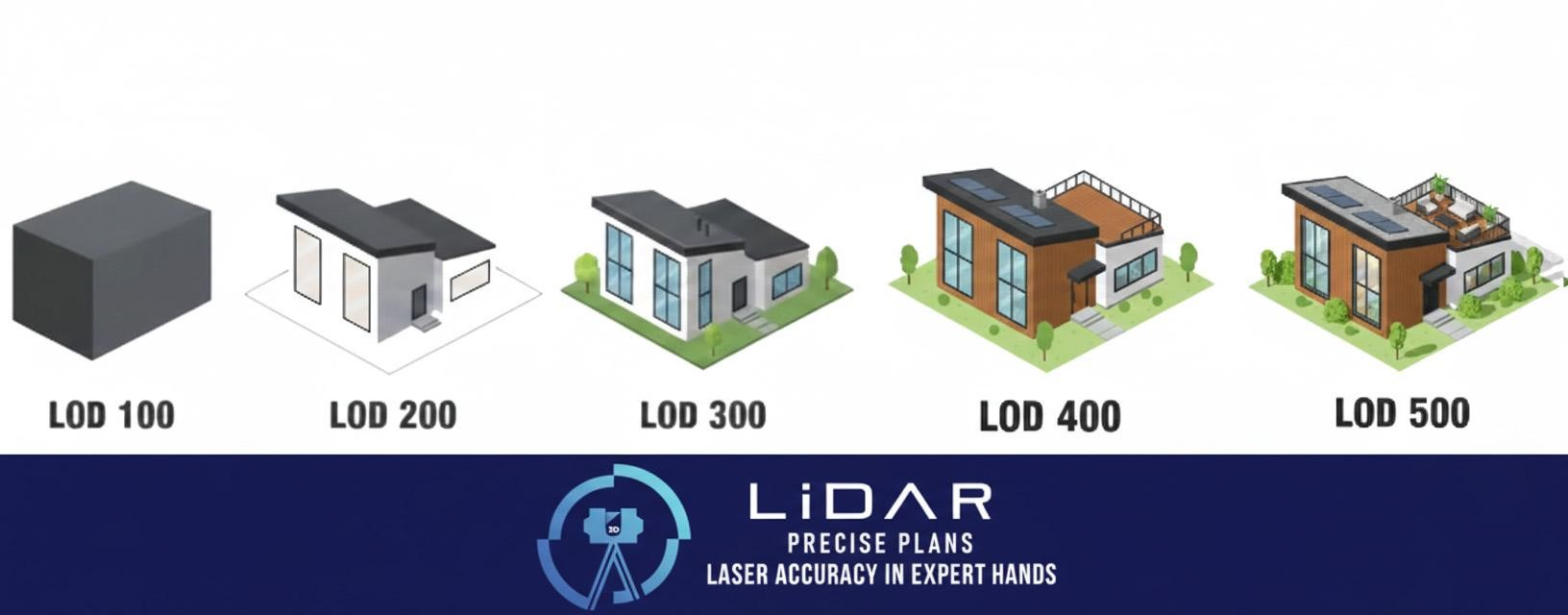
LOD 100 – Conceptual Massing
At LOD 100, model elements are symbolic — a box representing a wall, a cylinder standing in for a column. There are no accurate dimensions, no material data, and no construction intent.
Best for: Feasibility studies, early budgeting, site massing, space planning.
You cannot coordinate, permit, or build from LOD 100. It exists to answer the question “roughly how big is this thing and where does it sit?”
LOD 200 – Approximate Geometry
Now objects start to look like real building components. Walls look like walls. Doors resemble doors. Location and size are represented, but only approximately — expect tolerances of ±10–20%.
Best for: Schematic design, early contractor coordination, preliminary pricing conversations.
LOD 200 is useful for getting everyone oriented to a project, but it is not construction-ready. Decisions made from LOD 200 geometry carry real risk of field conflicts.
LOD 300 – Construction-Ready Accuracy
This is where most as-built BIM models land — and for good reason. At LOD 300, elements are dimensionally accurate (typically within ±¼”), properly located, and represent actual geometry with enough specificity for permit submission and construction documents.
Best for: Renovations, tenant improvements, retail build-outs, hospitality remodels, permit sets, clash detection.
For commercial architects working in markets like Las Vegas, Phoenix, Los Angeles, Denver, and Austin, LOD 300 is the baseline for any serious as-built engagement. It’s what you need to redesign confidently, coordinate with consultants, and submit for permits without field surprises.
Non-graphic information — equipment specifications, material callouts, maintenance data — is not attached at LOD 300. That’s a separate conversation about LOI (Level of Information), covered below.
LOD 350 – Coordination Level
LOD 350 adds system interfaces and connections to the LOD 300 geometry. Think duct connections to diffusers, pipe penetrations through walls, structural bearing relationships, hangers, and clearance zones.
Best for: Projects with tight ceiling spaces, congested MEP shafts, or multiple trades working in close proximity. Essential for full BIM coordination workflows where clash detection needs to catch real conflicts — not just geometry overlaps.
If your project involves significant MEP work or close coordination between structural, mechanical, and architectural systems, LOD 350 is the level that actually prevents costly field conflicts from becoming change orders.
LOD 400 – Fabrication Detail
LOD 400 includes fabrication-level detail: exact tolerances, specific assembly sequences, weld specifications, fastener callouts, and confirmed material properties. A contractor or fabricator should be able to manufacture directly from a LOD 400 model without additional interpretation.
Best for: Prefabricated MEP assemblies, structural steel connections, custom millwork, any element being manufactured off-site for precise field installation.
Important: Most projects do not need LOD 400 building-wide. It is applied selectively — typically to the elements where a fabrication mismatch would be the most expensive to fix in the field.
LOD 500 – Field-Verified As-Built
LOD 500 means every modeled element has been physically verified in the field and certified by the documenting firm as representing actual installed conditions. This is the most rigorous and most time-intensive level.
Best for: Hospitals, universities, government buildings, and any owner integrating as-built data into a CMMS (Computerized Maintenance Management System) or BIM-based facilities management platform.
LOD 500 is the right answer when the model needs to serve as a permanent, trusted record of a building — not just support a renovation project and then get archived.
LOD Reference Chart
| LOD | Common Name | Accuracy | Field-Verified? | Typical Use |
|---|---|---|---|---|
| 100 | Conceptual | Symbolic | No | Feasibility, early budgeting |
| 200 | Schematic | ±10–20% | No | Schematic design, early coordination |
| 300 | Construction Docs | ±¼" | No | Permits, renovation, tenant improvement |
| 350 | Coordination | ±¼" + connections | No | MEP coordination, clash detection |
| 400 | Fabrication | ±⅛" or tighter | Partially | Prefab, structural steel, millwork |
| 500 | As-Built Verified | ±⅛" certified | Yes | Facility mgmt, CMMS, major renovations |
LOD 300 vs LOD 400 — What’s the Real Difference?
This is one of the most common questions we get, and the answer is simpler than most people expect.
Moving from LOD 300 to LOD 400 typically increases modeling time significantly. That cost is justified when elements are being fabricated off-site — but unnecessary when the model is being used only for renovation planning.
| Feature | LOD 300 | LOD 400 |
|---|---|---|
| Geometric Accuracy | ±¼" | ±⅛" or tighter |
| What It Supports | Design and permit documentation | Direct fabrication and manufacture |
| When You Need It | Renovation planning, coordination | Prefab systems, steel, custom millwork |
| Typical Project Scope | Whole building baseline | Applied selectively by element |
The practical rule: if you are not fabricating components directly from the model, you probably do not need LOD 400. The upgrade from LOD 300 to LOD 400 adds real cost and modeling time — it’s worth it when the risk of a fabrication mismatch justifies the investment, and not when it doesn’t.
LOD Is Not the Same as Scope of Work
This is where most project misalignments begin.
Scope of work defines what elements get modeled — walls, ceilings, MEP systems, structural framing, exterior envelope.
LOD defines how accurately each of those elements is modeled.
These are two separate decisions that both need to be specified in your contract. A proposal that says “Revit model of existing conditions” without defining either scope or LOD leaves enormous room for a deliverable that doesn’t meet your project’s needs.
A well-structured proposal will include a LOD Matrix — a table that assigns a specific LOD to each element category, identifies who is responsible for modeling it, and specifies the delivery milestone. The BIM Forum publishes a free template. Any documentation provider worth working with should include one in their proposal.
LOD vs. LOI — The Other Half of the Picture
In recent BIM Forum updates and in ISO 19650, a distinction is drawn between LOD (geometric accuracy) and LOI — Level of Information — the non-graphic data attached to a model element.
A mechanical unit can be modeled to LOD 400 geometry but carry LOI 200 data if its manufacturer, model number, and maintenance schedule haven’t been populated. For architects and contractors, LOD is usually enough. For facility managers who need to run maintenance scheduling from the model, both LOD and LOI need to be defined.
If your project involves equipment, systems, or spaces that will be maintained, scheduled, or managed long-term, define LOI requirements alongside LOD upfront — not after delivery.
How 3D Laser Scanning Maps to LOD

A 3D laser scan captures your building as a dense point cloud — typically tens of millions of measurement points accurate to ±2–6mm at normal working distances. That raw data becomes the foundation from which modeled deliverables are built.
The point cloud itself does not have an LOD designation. LOD applies to the modeled deliverable produced from that scan. This distinction matters — if your contract specifies “point cloud delivery only,” you are receiving raw scan data, not a BIM model with a LOD designation.
Here’s how typical scan-to-deliverable workflows map to LOD:
| Service | Typical LOD | Accuracy |
|---|---|---|
| 2D As-Built Floor Plans (CAD) | LOD 300 | ±¼" |
| Scan-to-BIM Architectural Model | LOD 300–350 | ±¼" or better |
| Scan-to-BIM with MEP Systems | LOD 350–400 | ±⅛" |
| Field-Verified As-Built Certification | LOD 500 | ±⅛" certified |
| Point Cloud Delivery Only | No LOD (Raw Data) | ±2–6mm |
What LOD Does Your Commercial Project Actually Need?
From years of documentation work across retail, hospitality, and commercial tenant improvement projects in the Southwest:
- Most renovation and TI projects: LOD 300 for architectural elements is the baseline. Where you're modifying or coordinating around existing MEP systems, LOD 350 prevents the coordination conflicts that become change orders.
- National retail rollouts: LOD 300 as-built deliverables for standard locations; LOD 350–400 for flagship locations where custom fixture integration requires tight tolerances.
- MEP contractors prefabricating off-site: LOD 400 for the systems being fabricated. A single field conflict on a prefab duct assembly can cost more than the entire scanning engagement — the investment in higher LOD pays for itself immediately.
- Facility management and CMMS integration: LOD 500 paired with LOI 400+ attribute data (equipment tags, model numbers, maintenance schedules).
- The most cost-efficient approach: Assign LOD by element category rather than applying one number to the whole building. LOD 400 for structural connections and major MEP equipment. LOD 300 for walls and slabs. LOD 200 for site context. This protects budget while eliminating risk where it actually drives project outcomes.
Common LOD Mistakes to Avoid
- Specifying LOD 500 for everything. LOD 500 means every element has been individually field-verified. Applied building-wide, it adds significant cost and time — most of which delivers no value if the model is being used for a tenant improvement, not long-term facility management.
- Leaving LOD undefined in the contract. "Existing conditions Revit model" without a LOD specification is an open invitation for misaligned expectations. Define LOD per element category, in writing, before modeling begins.
- Confusing point cloud delivery with BIM. A registered point cloud is high-accuracy measurement data — not a model. It has no LOD. Make sure your contract specifies the LOD of the modeled output, not just the accuracy of the scan.
- Ignoring LOI. Geometric accuracy without attribute data produces a model that looks complete but can't support operations, maintenance scheduling, or facility management. If the model has a life beyond the renovation project, define LOI requirements upfront.
Frequently Asked Questions
LOD stands for Level of Development (sometimes Level of Detail). It defines how accurate, complete, and trustworthy a BIM model element is, from conceptual massing at LOD 100 to field-verified as-built conditions at LOD 500. The framework is published by the BIM Forum and updated periodically.
LOD 300 is construction-document accuracy — accurate enough for permit submission, renovation planning, and coordination. LOD 400 is fabrication-level detail, accurate enough for a manufacturer to build directly from the model. Most projects need LOD 300 as a baseline and LOD 400 only for specific elements being fabricated off-site.
No — and they shouldn't. Best practice is a LOD Matrix that assigns the appropriate LOD to each element category based on how it will be used downstream. Applying the same LOD uniformly across a building either wastes budget on unnecessary detail or under-documents the systems where accuracy actually matters.
No. A point cloud is raw measurement data — the scan of the physical world. LOD applies to the BIM model created from that point cloud, not to the scan itself.
The primary U.S. standard is the BIM Forum LOD Specification, updated approximately every two to three years. Internationally, ISO 19650 uses a similar framework under different terminology. Some owners — large healthcare systems, government agencies, major universities — publish their own LOD requirements as part of their BIM Execution Plan templates.
The Bottom Line
LOD is not about making a model more detailed than it needs to be. It’s about making it detailed enough for how it will actually be used — and not a level more.
Too little LOD creates field conflicts, change orders, and coordination failures. Too much LOD wastes budget on precision that never drives a project decision. The right documentation partner defines the correct LOD before modeling begins — by element, by use case, and by risk.
LiDAR Precise Plans provides LOD 300–500 as-built documentation for commercial renovation, tenant improvement, and facility management projects across Las Vegas, Phoenix, Los Angeles, San Francisco, Denver, Salt Lake City, and Austin.